Most resumes never reach a human being. Before a hiring manager sees your application, a computer program called an applicant tracking system, ATS for short, reads the file, pulls out your name, your jobs and your skills, and decides whether you match the job. Fancy layouts with two columns, text boxes and graphics often confuse that software, and a confused ATS can drop a good candidate for no good reason. The safest layout is the simplest one: a single column, standard headings, and plain text.
That is exactly what this free printable simple resume template PDF gives you. It is a one-page, one-column resume with the headings employers expect, Summary, Experience, Education and Skills, and nothing that can trip up hiring software. The PDF has two pages after the cover: a filled example you can study, and a blank copy you can fill in with your own details. Download it free below, no sign-up, no email, and no account needed. While you wait to hear back, the free printable daily planner PDF keeps the job search organised day by day.
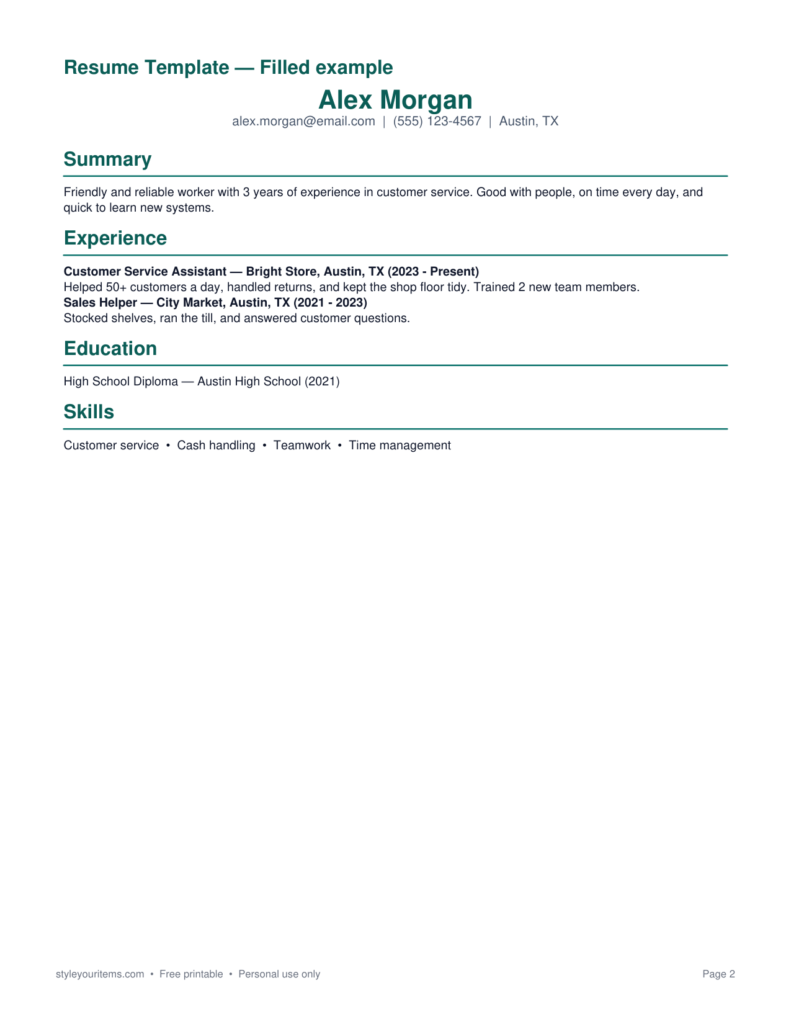
Alex Morgan’s Resume, Line by Line
The filled example in the PDF is a real, complete resume for a customer service worker. Here is what each part says, and why it works:
| Section | What the example says | Why it works |
|---|---|---|
| Name and contact | Alex Morgan, alex.morgan@email.com, (555) 123-4567, Austin, TX | One line, everything an employer needs to call you back. No photo, no home address, no extra detail. |
| Summary | Friendly and reliable worker with 3 years of experience in customer service. Good with people, on time every day, and quick to learn new systems. | Two sentences: what you do, how long you have done it, and two strengths that match the job. |
| Experience – job 1 | Customer Service Assistant, Bright Store, Austin, TX (2023 – Present). Helped 50+ customers a day, handled returns, kept the shop floor tidy, trained 2 new team members. | Numbers make it believable: 50+ customers a day and 2 people trained say more than “hardworking” ever could. |
| Experience – job 2 | Sales Helper, City Market, Austin, TX (2021 – 2023). Stocked shelves, ran the till, and answered customer questions. | One short line per job is enough when the work speaks for itself. The newest job always comes first. |
| Education | High School Diploma, Austin High School (2021) | School, qualification and year on a single line. No grades, no extra courses, no clutter. |
| Skills | Customer service, cash handling, teamwork, time management | Four skills that match the jobs above, every skill on the list is backed up by something in the experience section. |
Notice what the example leaves out: no objective statement, no hobbies, no references, and no long paragraphs. Every line either proves a skill or gives the employer a way to contact you. That is the whole job of a resume.
Turning the Blank Copy Into Your Resume
- Start with your name and one way to reach you. Your phone number and email address are enough. Use an email address that sounds professional, your name, not a nickname.
- Write the summary last, in two sentences. First fill in your jobs, then look at them and sum up: what you do, how long you have done it, and your two strongest qualities.
- List your jobs newest first. For each job, write the title, the company, the city and the years, then one or two lines about what you actually did, with a number in it if you can find one: customers served, items stocked, people trained.
- Keep education to one line per qualification. School or college, qualification and year. If you are still studying, write the expected year instead.
- Only list skills you can prove. If you write “cash handling”, the experience section should show a job where you handled cash. A short honest list beats a long invented one.
- Leave a line out rather than inventing it. If you have no second job yet, one job is fine. A gap you can explain is better than a job you cannot.
Why a Single Column Beats a Fancy Layout
Applicant tracking systems read a resume from top to bottom, left to right, like a plain document. When a resume has two columns, the software often reads across the page, mixing the left column with the right one, and turns your work history into nonsense. Tables, text boxes and graphics cause the same problem: the text inside them is sometimes skipped entirely, so a whole job can vanish from the version the employer sees.
This template avoids all of that. One column, standard headings in a normal order, and no tables or graphics means the software reads your resume in the same order a person would. It also means the resume prints cleanly on any printer, and it looks the same on screen as it does on paper. Simple is not a compromise here, it is the feature.
From Print to Inbox in Four Steps
- Print the blank page first. Print it on US Letter or A4 paper, at “Actual size” or “100%” so the spacing stays as designed.
- Draft it in pencil. Fill in the blank copy lightly in pencil first. It is much easier to fix a date or reword a sentence before the ink is permanent.
- Check every word, then write the final copy. Read it out loud once, your ear catches mistakes your eye misses. Check names, dates and phone numbers twice.
- Use it as a guide for your typed version. Most applications ask for a typed file. Type your resume following this exact layout, same headings, same order, same one-column structure, and it will pass through hiring software the same way. Once the job is yours, the free printable monthly planner PDF can map out your first month at work.
Simple ATS Resume Template: Your Questions Answered
Will this resume pass an applicant tracking system?
Yes, that is the point of the layout. One column, standard headings and no tables or graphics are exactly what ATS software reads best.
How many jobs should I list?
Two is enough for most entry-level and first-job applications. List your most recent jobs first, and only add older ones if they are relevant to the job you want.
Do I need a photo on my resume?
No. In the US and UK, photos are not expected and can even hurt your chances. The template has no photo space, and that is deliberate.
Can I use this for a first job with no experience?
Yes. Replace the experience section with school projects, volunteering or part-time work, anything that shows reliability and people skills.
Is the PDF really free?
Yes. The PDF is completely free, with no sign-up, no email address, and no account needed.
Details
- Format: free PDF download
- Paper size: US Letter and A4
- Layout: one column, standard headings, no tables or graphics
- Includes: filled example (Alex Morgan, customer service) plus a blank template
- Cost: free, no sign-up, no email, and no account needed
- Print as many copies as you like, for personal use
More Free Printables
Looking for more free printables? Browse the full Career & Business collection, or try these popular downloads: