
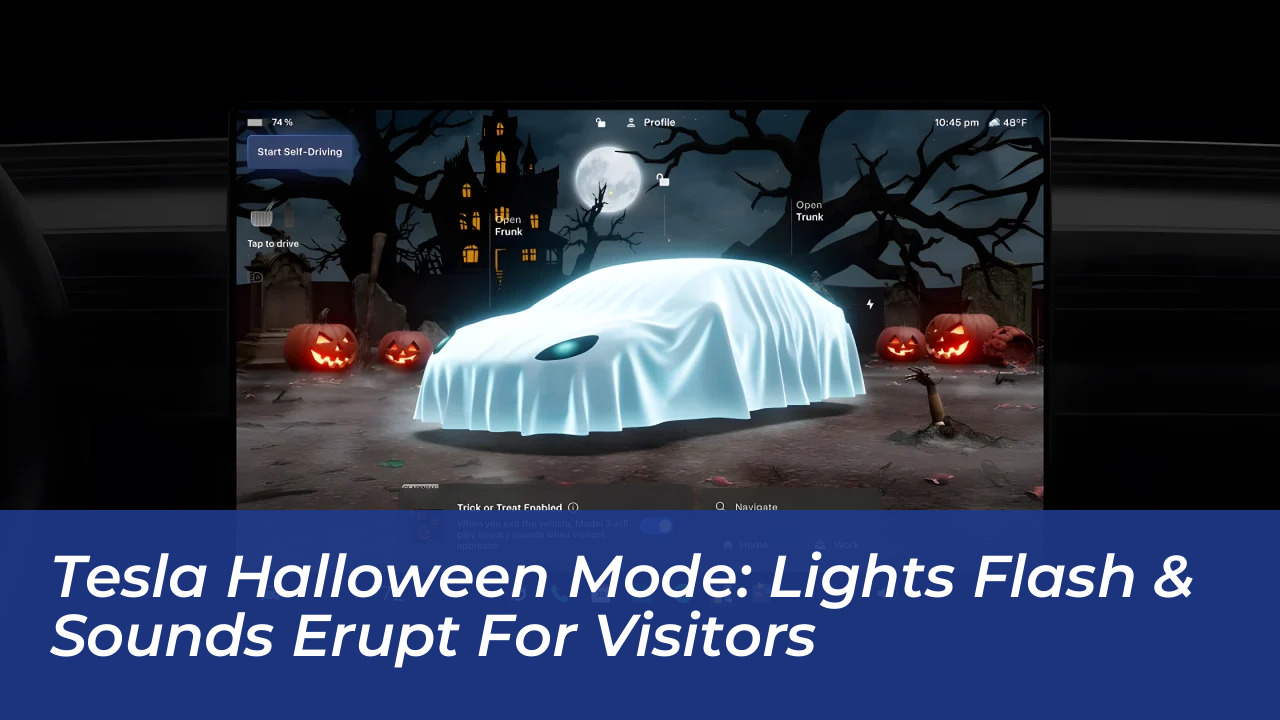

Tesla has officially rolled out its seasonal update 2026.38.3, transforming vehicles across the lineup into rolling haunted houses. The headline feature, Halloween Mode, introduces an interactive experience where the car’s exterior lights flash and it emits sounds of terror when someone approaches. Designed to add festive fun to driveways and parking spots, the feature builds on Tesla’s history of holiday-themed over-the-air software packages.
How Tesla Halloween Mode and Trick or Treat Work
Accessible directly from the vehicle’s center screen under the Toybox menu, Halloween Mode offers multiple ways to customize the car’s appearance and behavior. Once activated, the interface transforms to display haunted houses, full moons, jack-o’-lanterns, and graveyards.
The standout feature for visitors is the “Trick or Treat” mode. When enabled and the driver exits the vehicle, the car uses its sensors to detect nearby individuals. Upon detecting someone approaching, the Tesla triggers flashing exterior lights and plays spooky audio effects through its external speakers. While this mode is active, standard security features like Sentry Mode, the security alarm, and walk-away door locking are temporarily disabled to prevent conflicting operations.
Visual Transformations and Ghost Avatars
The update alters both stationary and driving visualizations:
- Ghost Costume: Drapes the on-screen digital avatar of the vehicle in a glowing white sheet with eye holes. Opening a vehicle door causes the on-screen ghost door to open as well.
- Driving Visualizations: Nearby vehicles on the display turn a glowing green color resembling ectoplasm, while pedestrians appear as walking skeletons on the center console.
- Themed Elements: Traffic lights change into colored pumpkins, and navigation paths under Full Self-Driving (Supervised) switch from blue to purple.
Remote Spooky Voices and Additional Features
Owners can also interact with visitors remotely using the Tesla mobile app. By speaking into a smartphone, the vehicle’s Boombox system broadcasts the voice through the exterior speaker in an altered, scary tone. This allows owners to greet trick-or-treaters or give directions without being inside the vehicle.
Additional holiday-themed tools included in software update 2026.38.3 feature a scheduled Fright Show light display synchronized to music, four custom vehicle wraps (including pumpkin patterns and ghost motifs), an owl hoot turn signal sound effect, and a holiday Photobooth option integrated into the media system.
Hardware Compatibility and Other Update Additions
Full functionality of Halloween Mode requires an AMD Ryzen infotainment processor. Vehicles equipped with older Intel processors may receive limited features, such as custom wraps or lock sounds, but miss out on the immersive 3D parked scene and Photobooth extras.
Beyond the holiday features, update 2026.38.3 includes practical improvements:
- Emergency Drive Away: Allows drivers to select a Drive gear while the vehicle remains plugged into a Supercharger, facilitating a fast exit during emergencies.
- Powershare Home Backup: Expands home energy backup capabilities to newer Model 3 and Model Y vehicles alongside the Cybertruck and Powerwall ecosystem.
Frequently Asked Questions About Tesla Halloween Mode
How do I turn on Halloween Mode in my Tesla?
Navigate to the Toybox application on your vehicle’s center touchscreen, locate Halloween Mode, and toggle the desired settings such as Ghost Costume or Trick or Treat.
Does Trick or Treat mode drain the car battery?
Yes. Because Trick or Treat mode keeps vehicle cameras awake and powers exterior lights and speakers, it consumes extra energy while parked and will automatically disable if the vehicle enters Low Power Mode.
Can I use Sentry Mode while Trick or Treat is enabled?
No. When you activate Trick or Treat mode, Sentry Mode, the security alarm, and walk-away door locking are automatically disabled.
Do all Tesla models support the full Halloween Mode?
No. Full features, including the interactive graveyard parked scene and Photobooth, require newer AMD Ryzen infotainment hardware. Intel-based vehicles have restricted feature availability.
Can I keep Halloween Mode turned on after October?
Yes. Similar to Tesla’s Santa Mode, Halloween Mode lives in the Toybox and can be activated at any time of the year.